Easy Presenter handles the tech so you can focus on what matters.
Easy Presenter is your all-in-one presentation companion. It lets you display slides, documents, videos, or live websites seamlessly on one or multiple screens — perfect for meetings, classrooms, and events. Built for clarity and control, it helps you present smoothly without technical distractions.
Key Features
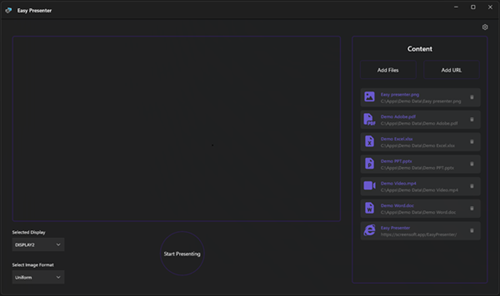
- Multi-screen presenting — project your content to any connected display with a single click.
- Unified format support — PowerPoint, PDF, Word, Excel, images, videos, and web pages.
- Quick add — drag & drop files or enter a web URL instantly.
- Built-in viewers — high-quality rendering for Office documents and media playback.
- Presenter-first UI — manage your session while your audience sees only the presentation.
- Smart controls — optimized power, sleep, and display settings.
What’s New in Version 2.0
- Fully refreshed modern interface.
- Improved WebView2 engine for faster web playback.
- Better performance and smoother file handling.
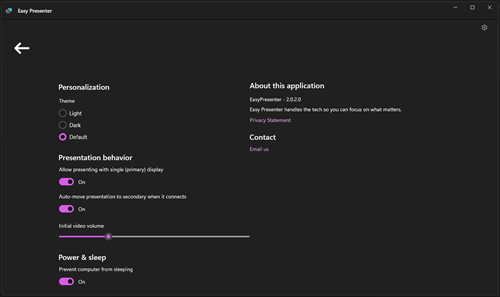
- New customization options for theme and behavior.
Quick Start
- Open Easy Presenter and add your files or web links.
- Select your target screen under Selected Display.
- Click Start Presenting to launch the full-screen view.
- Switch between content types during your presentation.
- Use Settings anytime to adjust appearance and behavior.
Download
Get Easy Presenter from the Microsoft Store and simplify your next presentation.
© 2026 ScreenSoft – All rights reserved.